01 / Connected enterprise
Customer & Sales Operations
Keep customer relationships and commercial activity connected.
- Customer records
- CRM
- Sales pipeline
- Quotations
- Orders
- Revenue visibility
Hypernet Enterprise Systems Infrastructure → intelligence → action
Hypernet connects infrastructure, operational intelligence, field teams, opportunities, workforce and enterprise resource planning around the way organizations actually work.
02 / Enterprise capabilities
From opportunities to business operations and payroll. Six connected capabilities, powered by three enterprise platforms.
01 / Connected enterprise
Keep customer relationships and commercial activity connected.
02 / Connected enterprise
Find the work worth pursuing.

03 / Connected enterprise
Connect purchasing decisions with the stock the business needs.
04 / Connected enterprise
Bring financial activity and approvals into one operational view.
05 / Connected enterprise
Connect employee records, time and payroll.
06 / Connected enterprise
Run the business through one connected system.
03 / GOPROC — Opportunity & Procurement Intelligence
The right opportunities, without the search chaos. Bring PhilGEPS opportunities and your other configured sources into one structured intelligence environment.
From external information to usable opportunity
Bring opportunities from PhilGEPS and other configured sources into one working environment.
PhilGEPS + configured sourcesStructure agency, project, category, budget, location, procurement type, deadlines, requirements, documents and reference information.
Notice → structured informationConfigure industry, services, products, agencies, keywords, location, budget, deadline and business category around your commercial focus.
ICT infrastructure · location · deadlineSurface opportunities relevant to the company’s capabilities and commercial focus. Review the fit before committing resources.
Company criteria → relevant opportunitiesReview the information, requirements and documents behind an opportunity without repeatedly searching through long notices.
Requirements · context · referencesKeep documents, requirements and supporting information with the opportunity, rather than scattered across downloads, emails and folders.
One opportunity · organized documentsMove relevant opportunities into the organization’s working pipeline, with the context the sales and administrative team needs.
Reviewing → qualified → preparingFollow new and qualified opportunities, upcoming deadlines, documents, work in progress, submissions, decisions, awards and history.
Discovery → submission → outcomeKnow why it matters before committing resources. Keep the information, requirements, documents and activity together from discovery to outcome.
Sales · Business Development · Administration · Procurement · Bid Teams · Management · Suppliers · ContractorsOne system. Every department connected.
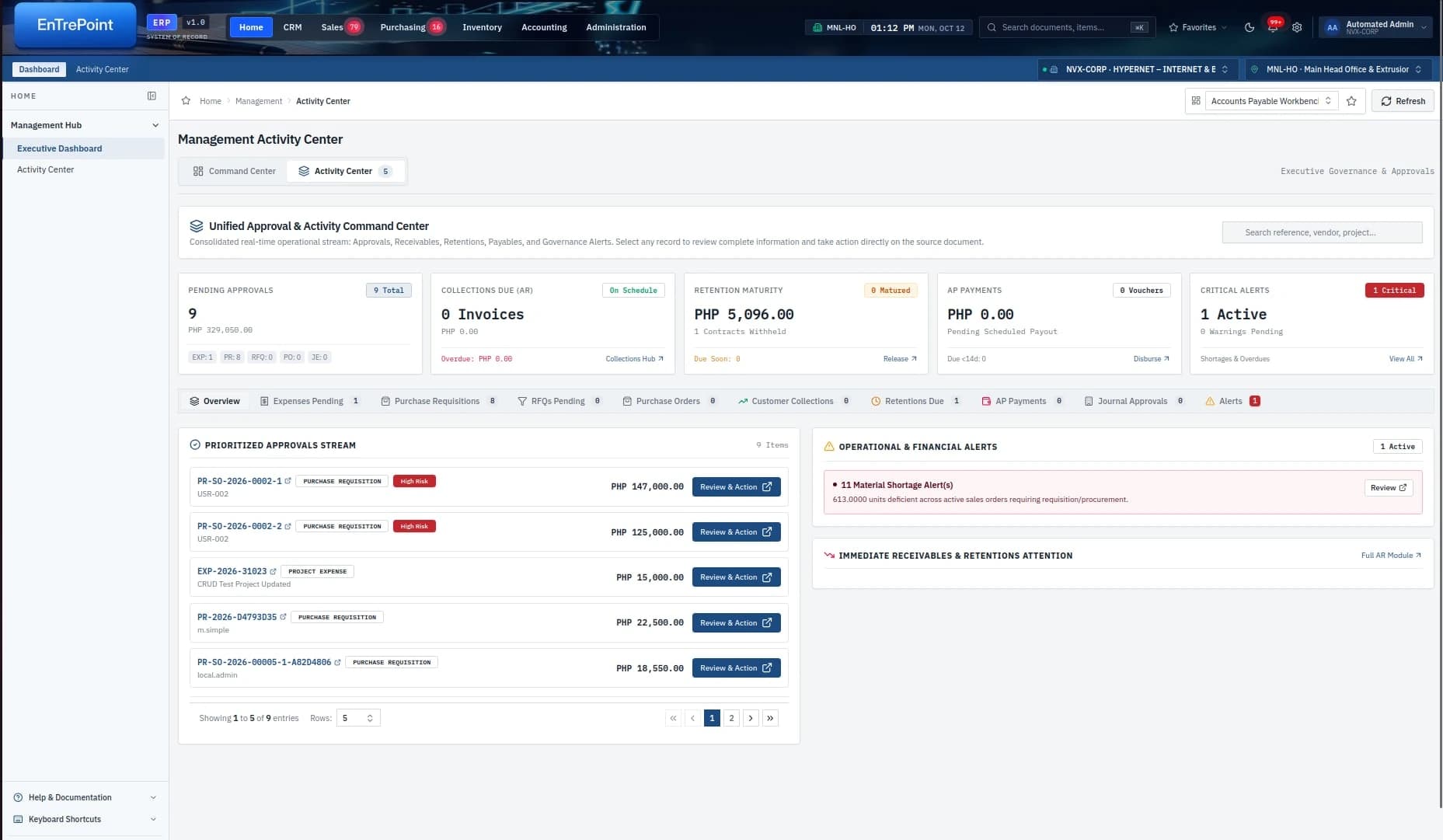
Executive Center
The Management Activity Center brings pending approvals, collections, retentions, payables and operational alerts into one executive view.
Real-time visibility across approvals and key operations.
Identify critical items before they impact the operation.
See financial and operational context in one view.
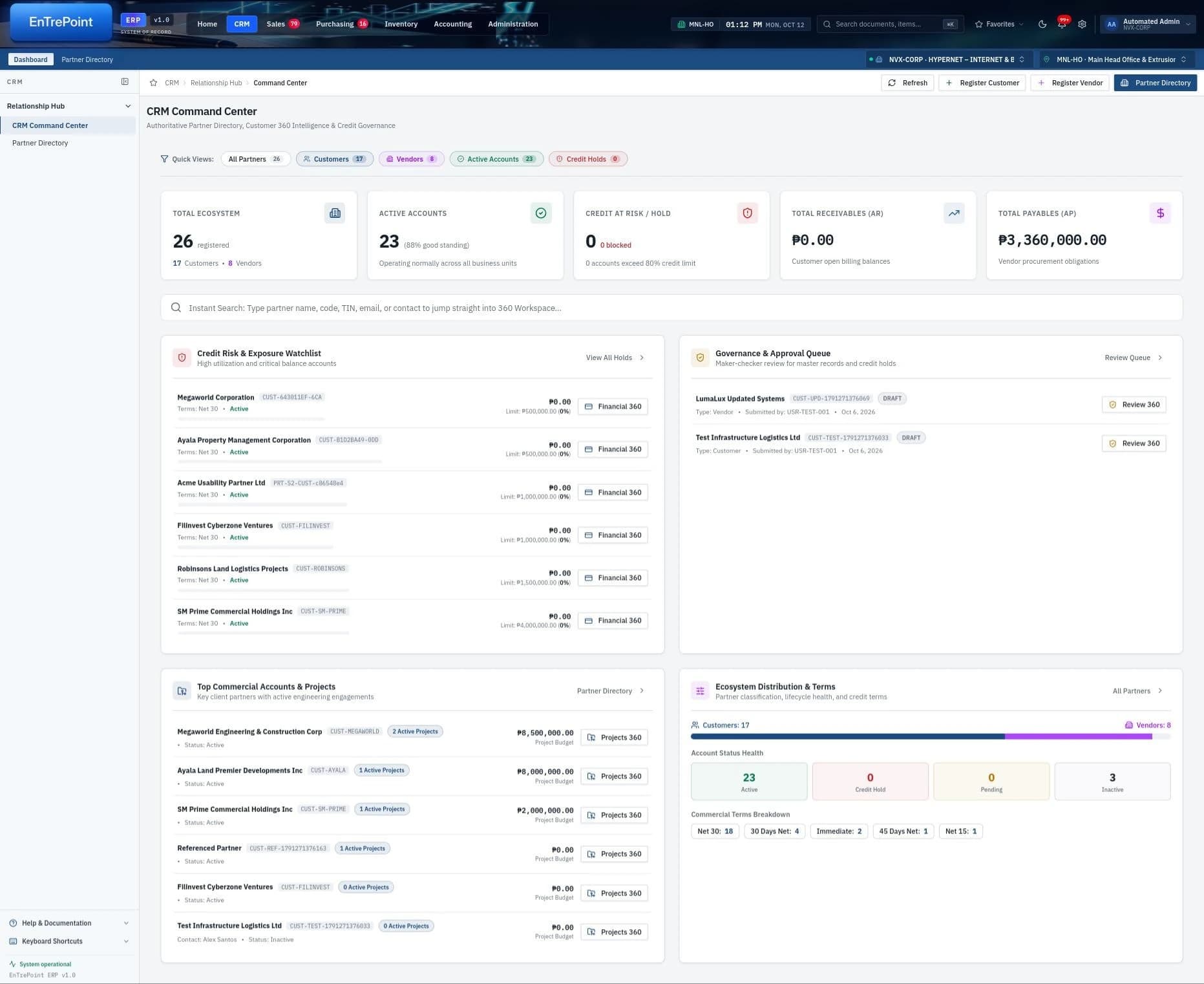
CRM
Connect customers, vendors, projects, financial exposure and account activity in one shared relationship workspace.
Bring partner records and account activity together.
Understand account health and credit governance.
Connect commercial relationships with the work behind them.
Sales
Track orders, delivery obligations, receivables, sales performance and customer activity from one commercial operating view.
See commercial performance and customer activity.
Follow open orders through delivery obligations.
Connect sales activity with outstanding receivables.
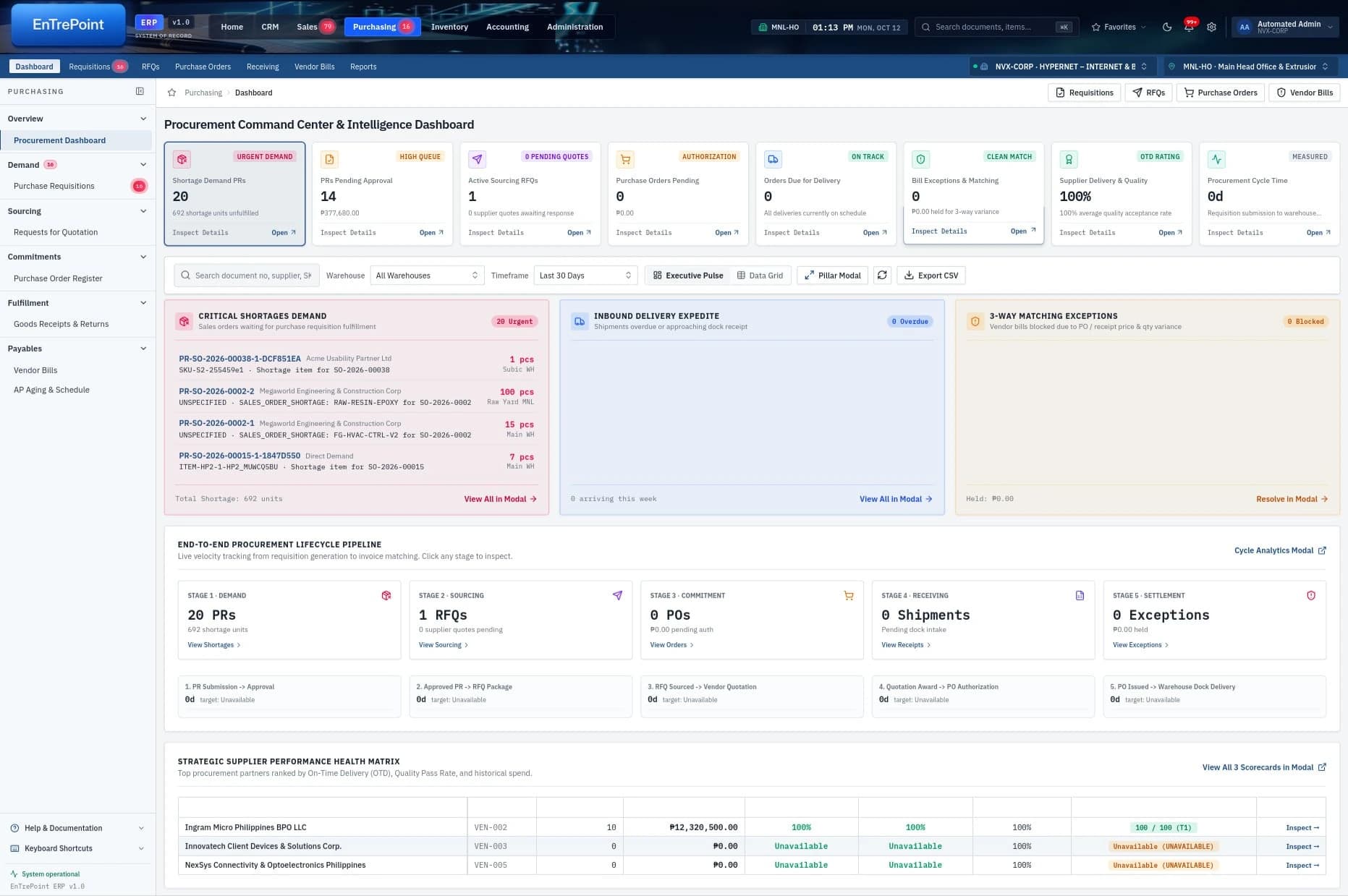
Procurement
Bring requisitions, sourcing, purchase orders, supplier performance, delivery and settlement into one connected procurement workflow.
Connect demand with sourcing and approvals.
See purchasing commitments and supplier performance.
Follow delivery, receiving and settlement exceptions.
Inventory
The Stock Hub brings availability, shortages, reservations, movement and warehouse exceptions into a shared inventory picture.
Understand availability, shortages and replenishment.
Follow reservations and stock across locations.
Connect operational demand with warehouse exceptions.
Executive Center — module 1 of 5
HR, TIME & PAYROLL OPERATIONS
Overview
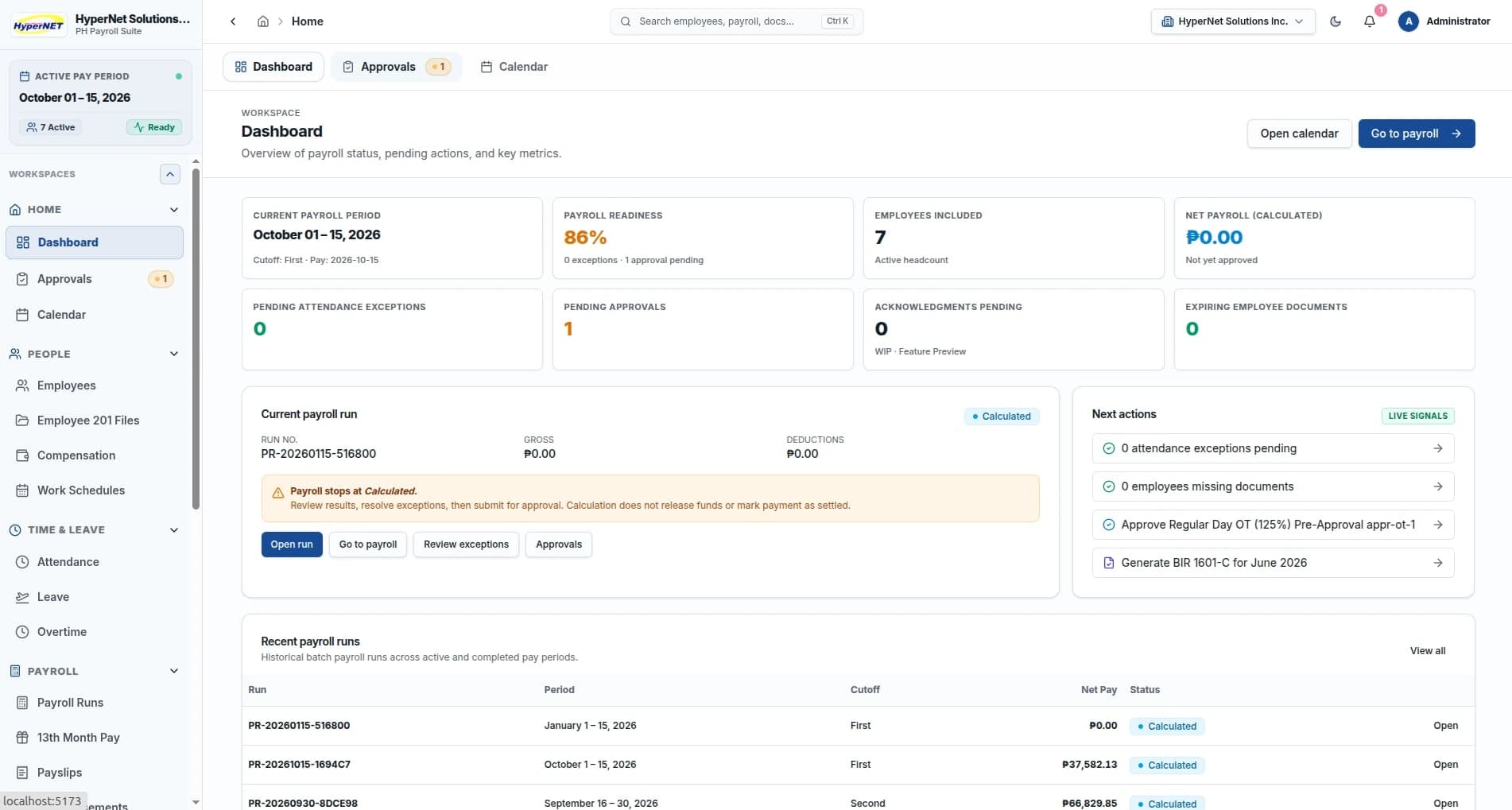
EnTrePoint HR & Payroll Suite brings employee records, attendance, leave, approvals and payroll processing into one operational workspace — from workforce administration through payroll release and payslip generation.
Keep employee and compensation records together.
Connect time and attendance with reviewed payroll inputs.
Follow payroll runs through review, approval and release.
Employee records
Bring employee records, Employee 201 files, compensation and work schedules into the workforce operation.
Keep workforce information available to responsible teams.
Review the compensation context behind payroll.
Maintain schedules alongside employee records.
Time & attendance
Connect attendance and DTR records with leave, overtime and the review of payroll inputs.
Review daily time records.
Follow leave and overtime requests.
Check the time inputs needed for payroll processing.
Payroll
Review payroll calculations, compensation, deductions and net pay in the employee payroll register, with payroll runs and approvals in the same workspace.
Follow payroll runs, approvals and the payroll calendar.
Review gross pay, deductions and net pay.
Manage 13th month pay, allowances, reimbursements, loans and cash advances.
Payslips
Review employee payslip details and payroll reports, with printable payslips and batch payslip printing.
Keep the employee payroll register and payslip details connected.
Review the actual printable payslip.
Prepare payslips across the payroll run.
Overview — module 1 of 5
A working enterprise
Bring infrastructure, opportunity, risk and workforce information into the context of the work.
Make assignments, requirements, documents and progress easier for the responsible teams to follow.
Give managers a shared picture of resources, activity and priorities across the organization.
From infrastructure to operations
Hypernet brings infrastructure, connectivity and operational software together around the work your organization actually needs to perform.
Talk to Hypernet